01 / 05
Know net profit instantly
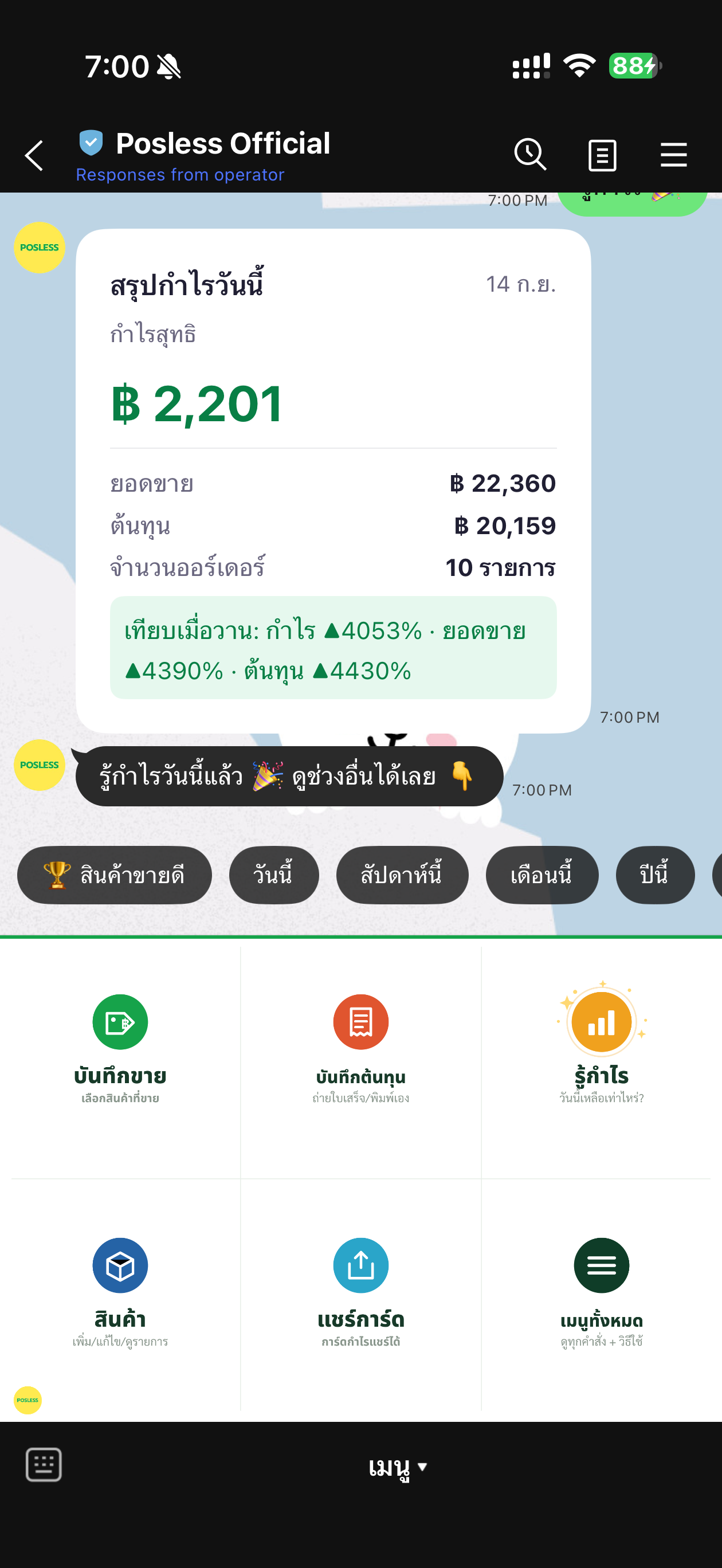
Sales, cost, profit and margin summarized automatically for any period.
Pick what you sold (or just type the product name), then snap the receipt and let AI read it as your cost. Posless shows your real profit (sales − cost) by day, week, month, and year. No POS hardware, no complicated setup.
PoslessSelling a lot does not mean earning a lot. But how do you know if you never have time to sit and work it out?
Plenty of money comes in, but after cost and expenses, how much actually stays? Hard to say.
When the shop is packed you’re run off your feet. Keying every bill in one by one just isn’t going to happen.
Purchase receipts pile up in a drawer, and by month end you can’t remember how much you actually spent.
Everything happens in a LINE chat — swipe through the real screens.
Sales, cost, profit and margin summarized automatically for any period.
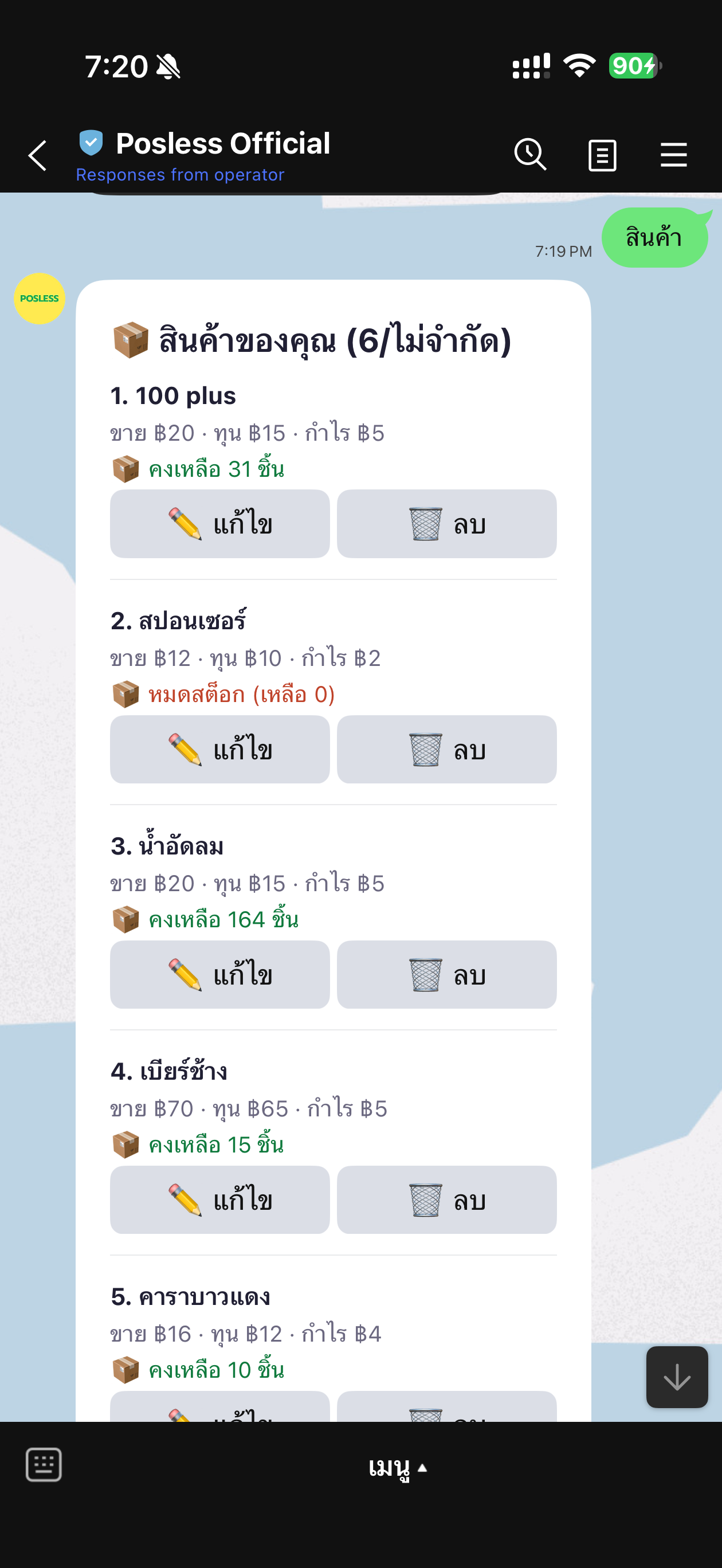
Add / edit / delete products and see stock left — no POS software to install.
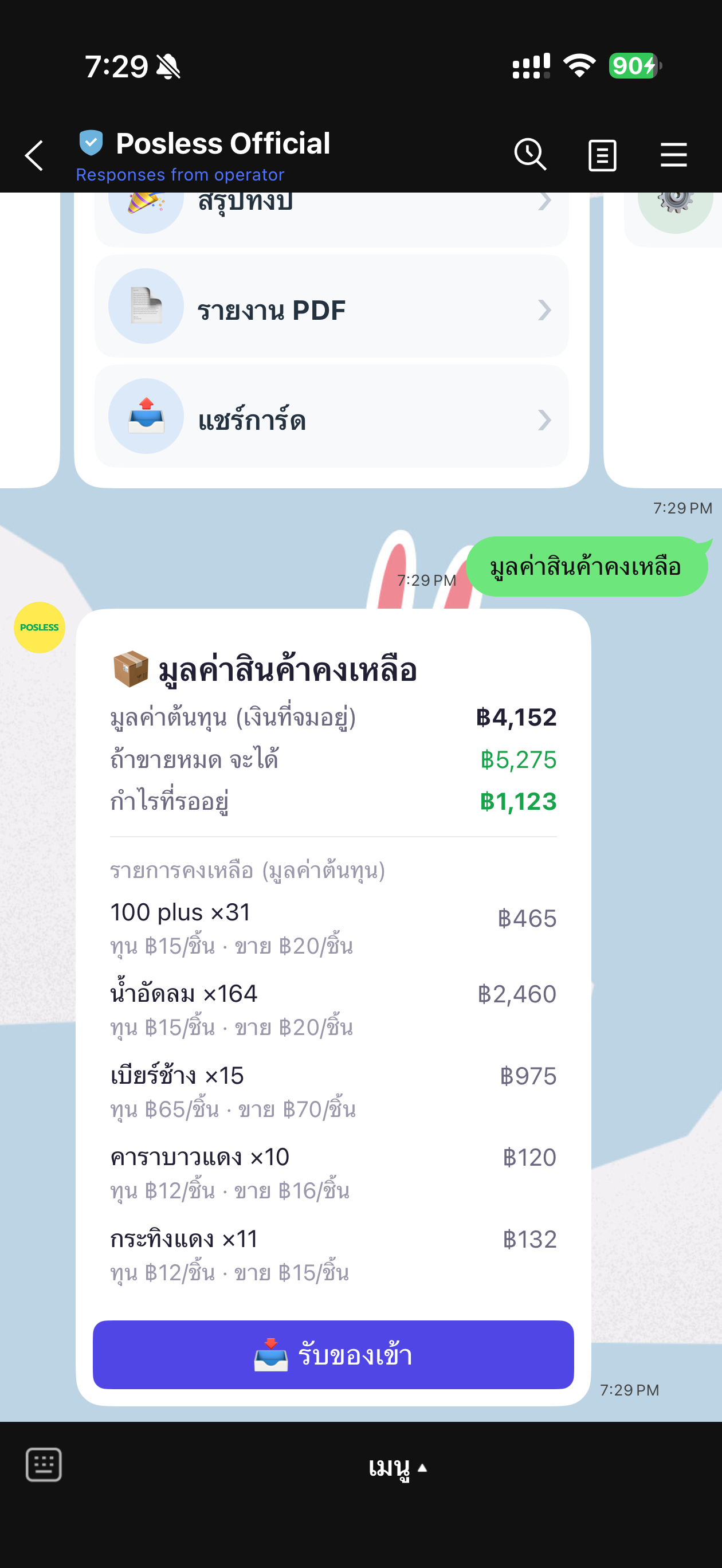
Remaining cost value + profit waiting if you sell out — right in LINE.
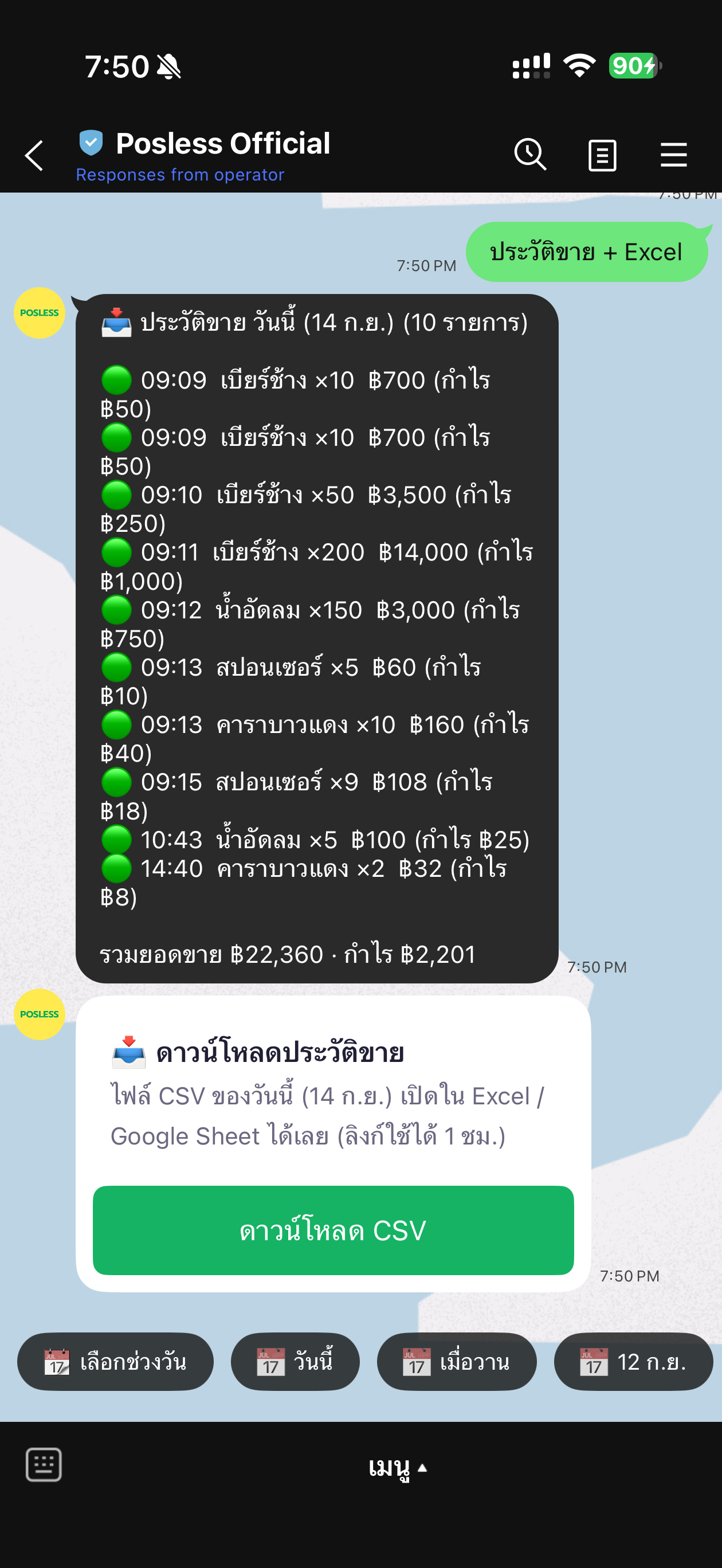
Browse past records and download as Excel/CSV, open in Google Sheets right away.
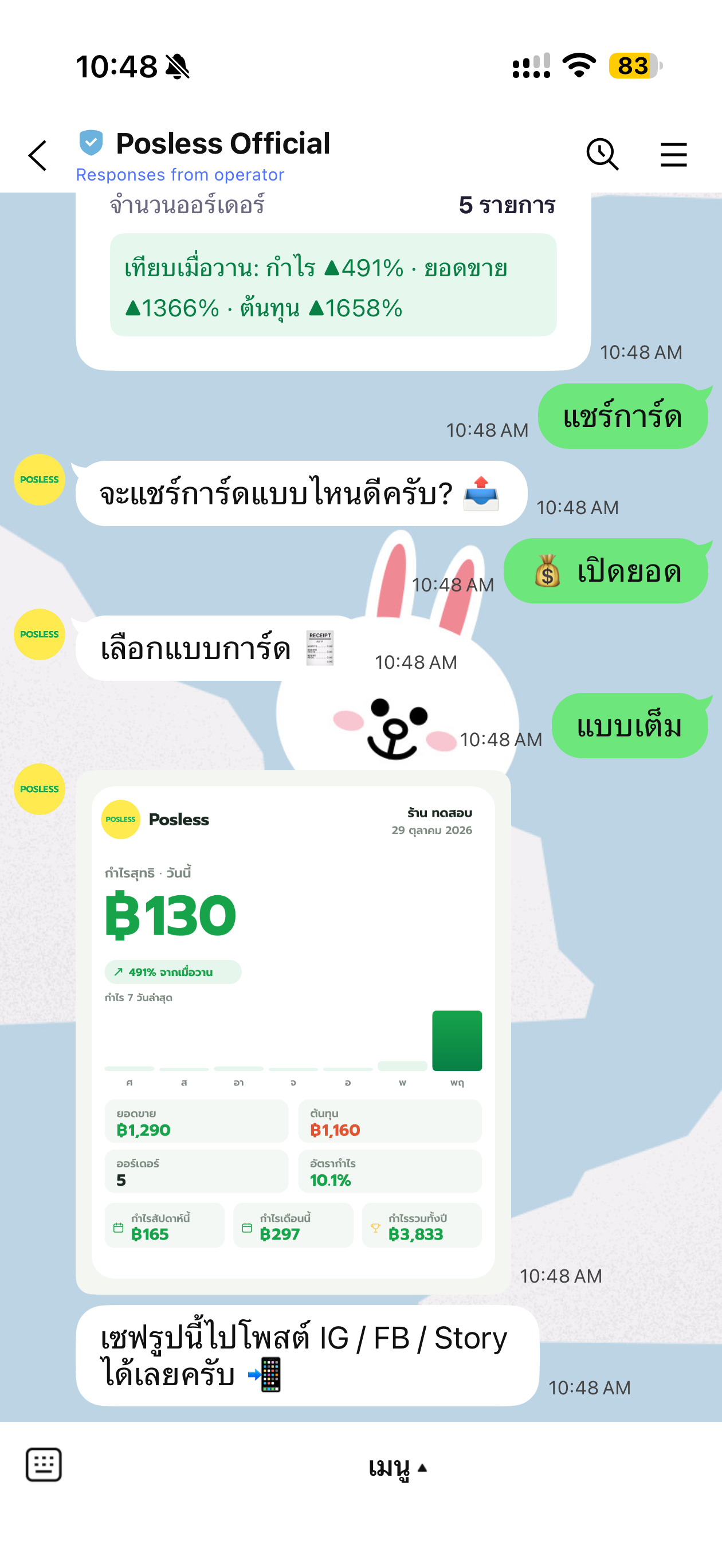
Auto-generate a clean summary card to post to Story / Facebook in one tap.
Add Posless on LINE, pick your language (Thai/English), then answer 4 quick questions. It sets things up to fit your shop, then you’re ready to track profit.
Posless Posless Posless Posless Done! Start logging sales, snapping receipts, and seeing profit right away.
Built for shop owners. Easy to use, real results.
Tap to pick what you sold, or type the name loosely (quantities in words are fine too) · sell several at once with commas, like “sell coffee 2, tea 1”. Posless works out real per item profit.
See how-toSnap a receipt and AI reads the total plus splits it into products (with per item cost) · no receipt? Just type it, like “cost ice 100”.
See how-toAdd, edit, or delete products in chat with step by step prompts. Store selling price + cost and see clear per item profit · add a duplicate name and it asks to update instead of creating a copy.
See how-toProfit (sales − cost) by day, week, month, and year — look back any period and see when your shop earns best · export profit / tax summaries as PDF (VIP).
See how-toDetailed daily sales history, broken down per item (time / product / qty / profit), downloadable as Excel/CSV to open in Google Sheets (VIP).
See how-toEvery day you get a clean profit card, colour coded for profit / break even / loss · pick a Full or Minimal layout and share it on social, plus a year end Wrapped card.
See how-toEnter rent / water / electricity once and Posless deducts it every month. Choose to spread it daily or take it in one lump → see real profit after everything, not just gross.
See how-toSee exactly how much cash is tied up in stock and how much profit is waiting once it sells · stock is deducted automatically on each sale · ideal for buy and resell shops, and you can switch it on/off (VIP).
See how-toAdd up to 6 users per shop · a “co-owner” sees everything (except money) · “staff” can log sales but can’t see profit, protecting your margins (VIP).
See how-toWe never store passwords, never ask for transfer rights, encrypt your data, and keep each shop’s data strictly separate.
Small or growing, see which plan fits your business.
Many menu items and shifting cost per cup. See per cup profit clearly.
Big menu, lots of ingredients. Keep your costs under control.
Many styles and sizes, plenty of SKUs without hitting a cap. See stock value on hand plus which items earn and which to clear.
📦 Great with inventory modeA wide range of products. Store per item cost accurately for sharp profit, plus value on hand.
📦 Great with inventory modeCharge per job, add parts and supplies, and see clear profit per job.
Car, AC, or electrical parts, stationery, thousands of SKUs. Add unlimited products.
📦 Great with inventory modeHundreds of products, unlimited, never hitting a cap.
📦 Great with inventory modeLots of orders and SKUs, with AI to help track profit and sales.
📦 Great with inventory modeFull year profit summary with a PDF tax report, personal or company.
A handful of items. Start knowing your profit today, free, no POS needed.
The suggested plan is just a starting point. Move up or down any time as your shop grows.
Every step happens in LINE — see the real screens in order. Tap to pick a plan, pay on a secure page, and you’re upgraded automatically.
Scroll to see the real screens, step by step →
PoslessPoslessPoslessPoslessPosless Charged automatically each cycle. Cancel anytime by tapping in LINE: “All menu” → “👑 My plan” → “Cancel auto-renew”.
No automatic charges. We’ll remind you before your plan expires — just pay again to renew whenever you like.
Enter payment details only on the secure payment page (via Omise). We never ask for your card number or OTP in the LINE chat.
Yearly is the better value, or pay monthly. No contract, cancel any time.
💳 Card = auto renews, cancel any time in LINE · 📱 PromptPay = pay per cycle, we remind you before it expires
Start knowing your profit today
No cost
Start freeBest value for shops selling every day
vs paying monthly ฿1,548/yr
or ฿129 / mo
For shops that hold stock to sell, or want a whole team
vs paying monthly ฿2,988/yr
or ฿249 / mo
Paid plans launching soon
Soon
We’ll let you know the launch date first.
The Pro plan is about to open for sign up.
For now, add Posless on LINE and start on the free plan. When paid plans go live, we’ll notify you to upgrade right in LINE.
While picking stock at the wholesaler, snap the shelf price tag and let AI work out the cost per unit and your profit instantly — before it goes in the cart.
Testing with a real shop — rolling out to VIP first in Q4 this year.
Not at all. Everything runs through LINE on the phone you already have. Just type, speak, or take a photo.
Sales: tap “Log sale” and pick a product and quantity, or type in LINE like “sell coffee” · sell several at once with commas, like “sell coffee 2, tea 1, water 3” (no product yet? add it first) · Cost: snap a purchase receipt and AI reads it, or type it yourself like “cost 250” · for things with no receipt (morning ice, market veg), add a label like “cost ice 100” so you know later what it was for.
Type right in LINE: “sell coffee” (sell by product name) or “sell coffee 2, tea 1” (several at once), or tap “Log sale” and pick · “cost 250” (log cost yourself) · snap a receipt (AI reads the cost) · “product coffee 60 25” (add a product) · “rent 8000” (set a recurring expense, type a name + amount, then type “recurring” to view / change how it’s deducted / delete via buttons) · “profit summary” · “recent entries” · “sales history” (VIP: daily view + Excel export) · “upgrade” · “my plan”, or type “help” and it pops up the full guide. Mistype a command and it shows you the right one.
Easy. Type “add product” and it asks step by step (name → selling price → cost), or do it in one line: “product coffee 60 25”. Then sell by name, like “sell coffee” or “sell two coffees” (loose typing and word quantities are fine) · view the list and edit/delete with buttons · caps by plan: Free 5 products, Pro 50, VIP unlimited.
Yes (Pro/VIP scan at real usage limits · up to Pro 100 · VIP 300 per month · Free lets you try 3 times). Snap a purchase receipt and Posless tries to split it into items with per item cost. Just tap “make a product” and set your selling price · it looks at your shop type to suggest only “likely resale items” and filters out consumables (bags, straws, ice, delivery) · for “make it yourself” shops (cafés, restaurants) the bill is usually ingredients, so it won’t suggest products but still logs the full cost · good to know: AI may not read/classify perfectly every time (check before confirming, and you can always add manually) · buying by the pack/case may give a per pack cost you’ll need to adjust per item · you always set the selling price.
Products: add a name that already exists and it won’t create a copy, it asks whether to “update” the price/cost or “skip” and keep the current one · Cost/receipts: nothing is saved automatically, you confirm every time, and if you just logged the same amount a moment ago it warns “if it’s the same bill, no need to tap again”. We deliberately don’t block matching amounts, because some things really are bought again every day (like ice at the same price).
“Net profit” on the card is sales − per item cost of what you sold (COGS) − other logged expenses (receipts / typed “cost”) − recurring expenses · the per item cost set on a product is deducted automatically on each sale (matching the profit shown at sale time), so you don’t log the purchase cost of that item again · use “cost” / receipts for other expenses instead, like ice, bags, delivery, utilities · with inventory mode on (VIP), restocking uses “receive stock”, which doesn’t deduct profit twice.
Yes · recent entries are on every plan, type “recent entries” · VIP gets detailed daily “sales history” (per item: time / product / quantity / profit), you can look back and download to Excel/CSV to open in Excel or Google Sheets · we keep your data in full and don’t wipe it daily, so you can export to back up any time.
Yes (VIP). Turn on “inventory mode” in settings and log what you buy in (type “receive”) · stock is deducted automatically on each sale · type “inventory” to see how much cash is tied up in stock right now (cost value on hand), what you’d earn if it all sold, and the profit still waiting · choose whether an out of stock item can still “sell (with a warning)” or is “blocked from selling” · ideal for buy and resell shops (grocery / clothing / parts) · switch it on/off, not forced · net profit is calculated separately from stock, no double counting.
Yes (VIP). Add up to 6 users per shop · the owner creates an “invite code”, the person adds Posless on their own LINE and types “join shop” plus the code, and they can log sales in the same shop · two roles: “co owner” sees everything (except money / user management) · “staff” can log sales/costs but can’t see profit and reports (protecting your margins) · the owner can remove people or change roles any time.
AI reads the “total” on Thai receipts well, and every time it asks you to “confirm or fix the amount” before saving, so you can trust the number · splitting into line item products is harder and names/costs may not be perfect, so you always review and set the selling price before saving as products.
No account linking and never any bank password/PIN. Posless never asks for transfer rights, encrypts your data, and follows PDPA.
Start free right away, just add Posless on LINE and answer a few short questions. Want more features? Upgrade to Pro/VIP later.
Add Posless on LINE today. Start free, with no hidden costs.
Add on LINE (free)